Mobile app end-user licence agreement
PLEASE READ THESE LICENCE TERMS CAREFULLY
BY CLICKING ON THE “ACCEPT” BUTTON BELOW YOU AGREE TO THESE TERMS WHICH WILL
BIND YOU.
IF YOU DO NOT AGREE TO THESE TERMS, CLICK ON THE “REJECT” BUTTON BELOW.
WHO WE ARE AND WHAT THIS AGREEMENT DOES
We, National Ice Skating Association of the United Kingdom Limited
(CRN:02677064) trading as ‘British Ice Skating’ of Eis Sheffield, Coleridge
Road, Sheffield, South Yorkshire, S9 5DA license you to use:
-
Skate UK mobile application software, the data supplied with the
software, (App) and any updates or supplements to it.
- The related online electronic documentation (Documentation); and
-
The service you connect to via the App and the content we provide to you
through it (Service).
as permitted in these terms.
Skate UK is a learn to skate programme delivered by partnering rinks which
teaches the fundamentals of ice skating. This programme will have an
accompanying App to engage the user and educate skaters through specifically
designed content.
MEMBERSHIPS
The App will allow our membership types different levels of access:
No membership is required to complete the sign-up process which allows the
user to see content for levels 1-3 and a progress tracker (
Progress
Tracker)
. There is no cost for this.
- Skate UK Full Member – This membership will unlock all content for levels 1-8 on the App and Progress Tracker.
- Skate UK Green Member – This membership will unlock content for levels 1-8 on the App, Progress Tracker and include a downloadable certificate for each level.
- Skate UK membership term will finish on completion of the star program or when gaining a BIS membership.
- British Ice Skating full members, associate and life members will have all the content unlocked while their memberships are active on the Sport 80 database.
- British Ice Skating fully licensed coaches will have full access to content with additional coaching notes and pages to assist in delivering the Skate UK programme.
- All memberships are non-transferable.
Each Skate UK membership will start on the day the membership was purchased.
Star Programme – the star booklet content will be unlocked when the user has purchased the star programme booklet / add-on through the App.
When signing up to the Skate UK memberships, the user will also agree to abide by British Ice Skating policies and procedures. https://www.iceskating.org.uk/policies.
YOUR PRIVACY
Under data protection legislation, we are required to provide you with certain information including who we are, how we process your personal data and for what purposes and your rights in relation to your personal data and how to exercise them. This information is provided in our privacy notice, available here: https://www.iceskating.org.uk/privacy-policy and it is important that you read that information.
Registration and Membership sign-up and information will be collected and shared by our third-party partners, Syrox Limited (CRN:09806548) and Sport:80 Services Limited (CRN: 08324832). All sharing and processing of data shall be done in accordance with our data protection policies and procedures.
APPLE STORE / GOOGLE PLAY STORE TERMS ALSO APPLY
The ways in which you can use the App and Documentation may also be controlled by the Apple Store and/or Google Play Store rules and policies. Those rules and policies may apply instead of these terms where there are differences between the two.
SUPPORT FOR THE APP AND HOW TO TELL US ABOUT PROBLEMS
Support. If you want to learn more about the App or the Service or have any
problems using them please take a look at our support resources at
https://www.iceskating.org.uk/.
Contacting us (including with complaints). If you think the App or the
Services are faulty or misdescribed or wish to contact us for any other
reason please email our customer service team at skateUK@iceskating.org.uk
or call them on 01159 888 060.
How we will communicate with you. If we have to contact you we will do so by
email, by SMS or by pre-paid post, using the contact details you have
provided to us.
HOW YOU MAY USE THE APP, INCLUDING HOW MANY DEVICES YOU MAY USE IT ON
In return for your agreeing to comply with these terms you may:
-
download or stream a copy of the App onto a mobile device or handheld
tablet to which the App may be downloaded or streamed and view, use and
display the App and the Service on such devices for your personal
purposes only.
-
use any Documentation to support your permitted use of the App and the
Service; and
-
receive and use any free supplementary software code or update of the
App incorporating “patches” and corrections of errors as we may provide
to you.
YOU MUST BE 18 TO ACCEPT THESE TERMS AND DOWNLOAD THE APP
You must be 18 or over to accept these terms and download the App.
YOU MAY NOT TRANSFER THE APP TO SOMEONE ELSE
We are giving you personally the right to use the App and the Service as set
out above. You may not otherwise transfer the App or the Service to someone
else, whether for money, for anything else or for free. If you sell any
device on which the App is installed, you must remove the App from it.
The App requires a registration. Each registration is for a single user only
and we do not permit you to share your user name and password with any other
person nor with multiple users on a network.
CHANGES TO THESE TERMS
We may need to change these terms to reflect changes in law or best practice
or to deal with additional features which we introduce.
We will give you at least 30 days’ notice of any change by sending you an
email or SMS with details of the change or notifying you of a change when
you next start the App.
If you do not accept the notified changes you may continue to use the App
and the Service in accordance with the existing terms but certain new
features may not be available to you.
UPDATE TO THE APP AND CHANGES TO THE SERVICE
From time to time we may automatically update the App and change the Service
to improve performance, enhance functionality, reflect changes to the
operating system or address security issues. Alternatively we may ask you to
update the App for these reasons.
If you choose not to install such updates or if you opt out of automatic
updates you may not be able to continue using the App and the Services.
The App will always work with the current or previous version of the
operating system (as it may be updated from time to time) and match the
description of it provided to you when you bought it, so far as is possible.
IF SOMEONE ELSE OWNS THE PHONE OR DEVICE YOU ARE USING
If you download or stream the App onto any phone or other device not owned
by you, you must have the owner’s permission to do so. You will be
responsible for complying with these terms, whether or not you own the phone
or other device.
WE ARE NOT RESPONSIBLE FOR OTHER WEBSITES YOU LINK TO
The App or any Service may contain links to other independent websites which
are not provided by us. Such independent sites are not under our control,
and we are not responsible for and have not checked and approved their
content or their privacy policies (if any).
You will need to make your own independent judgement about whether to use
any such independent sites, including whether to buy any products or
services offered by them.
LICENCE RESTRICTIONS
You agree that you will:
-
not rent, lease, sub-license, loan, provide, or otherwise make
available, the App or the Services in any form, in whole or in part to
any person without prior written consent from us;
-
not copy the App, Documentation or Services, except as part of the
normal use of the App or where it is necessary for the purpose of
back-up or operational security;
-
not translate, merge, adapt, vary, alter or modify, the whole or any
part of the App, Documentation or Services nor permit the App or the
Services or any part of them to be combined with, or become incorporated
in, any other programs, except as necessary to use the App and the
Services on devices as permitted in these terms;
-
not disassemble, de-compile, reverse engineer or create derivative works
based on the whole or any part of the App or the Services nor attempt to
do any such things, except to the extent that (by virtue of sections 50B
and 296A of the Copyright, Designs and Patents Act 1988) such actions
cannot be prohibited because they are necessary to decompile the App to
obtain the information necessary to create an independent program that
can be operated with the App or with another program
(Permitted
Objective
), and provided that the information obtained by you during
such activities:
-
is not disclosed or communicated without the Licensor’s prior written
consent to any third party to whom it is not necessary to disclose or
communicate it in order to achieve the Permitted Objective; and
-
is not used to create any software that is substantially similar in its
expression to the App;
- is kept secure; and
- is used only for the Permitted Objective;
-
comply with all applicable technology control or export laws and
regulations that apply to the technology used or supported by the App or
any Service.
ACCEPTABLE USE RESTRICTIONS
You must:
-
not use the App or any Service in any unlawful manner, for any unlawful
purpose, or in any manner inconsistent with these terms, or act
fraudulently or maliciously, for example, by hacking into or inserting
malicious code, such as viruses, or harmful data, into the App, any
Service or any operating system;
-
not infringe our intellectual property rights or those of any third
party in relation to your use of the App or any Service, including by
the submission of any material (to the extent that such use is not
licensed by these terms);
-
not transmit any material that is defamatory, offensive or otherwise
objectionable in relation to your use of the App or any Service;
-
not use the App or any Service in a way that could damage, disable,
overburden, impair or compromise our systems or security or interfere
with other users; and
-
not collect or harvest any information or data from any Service or our
systems or attempt to decipher any transmissions to or from the servers
running any Service.
INTELLECTUAL PROPERTY RIGHTS
All intellectual property rights in the App, the Documentation and the
Services throughout the world belong to us (or our licensors) and the rights
in the App and the Services are licensed (not sold) to you. You have no
intellectual property rights in, or to, the App, the Documentation or the
Services other than the right to use them in accordance with these terms.
OUR RESPONSIBILITY FOR LOSS OR DAMAGE SUFFERED BY YOU
We are responsible to you for foreseeable loss and damage caused by us. If
we fail to comply with these terms, we are responsible for loss or damage
you suffer that is a foreseeable result of our breaking these terms or our
failing to use reasonable care and skill , but we are not responsible for
any loss or damage that is not foreseeable. Loss or damage is foreseeable if
either it is obvious that it will happen or if, at the time you accepted
these terms, both we and you knew it might happen.
We do not exclude or limit in any way our liability to you where it would be
unlawful to do so
. This includes liability for death or personal injury
caused by our negligence or the negligence of our employees, agents or
subcontractors or for fraud or fraudulent misrepresentation.
When we are liable for damage to your property. If defective digital content
that we have supplied damages a device or digital content belonging to you,
we will either repair the damage or pay you compensation. However, we will
not be liable for damage that you could have avoided by following our advice
to apply an update offered to you free of charge or for damage that was
caused by you failing to correctly follow installation instructions or to
have in place the minimum system requirements advised by us.
We are not liable for business losses. The App is for domestic and private
use. If you use the App for any commercial, business or resale purpose we
will have no liability to you for any loss of profit, loss of business,
business interruption, or loss of business opportunity.
Limitations to the App and the Services. The App and the Services are
provided for general information and entertainment purposes only. They do
not offer advice on which you should rely. You must obtain professional or
specialist advice before taking, or refraining from, any action on the basis
of information obtained from the App or the Service. Although we make
reasonable efforts to update the information provided by the App and the
Service, we make no representations, warranties or guarantees, whether
express or implied, that such information is accurate, complete or up to
date.
Please back-up content and data used with the App. We recommend that you
back up any content and data used in connection with the App, to protect
yourself in case of problems with the App or the Service.
Check that the App and the Services are suitable for you. The App and the
Services have not been developed to meet your individual requirements.
Please check that the facilities and functions of the App and the Services
(as described on the Apple Store and/or the Google Play Store and in the
Documentation) meet your requirements.
We are not responsible for events outside our control. If our provision of
the Services or support for the App or the Services is delayed by an event
outside our control then we will contact you as soon as possible to let you
know and we will take steps to minimise the effect of the delay. Provided we
do this we will not be liable for delays caused by the event but if there
is a risk of substantial delay you may contact us to end your contract with
us and receive a refund for any Services you have paid for but not received.
GENERAL DISCLAIMER
While we endeavour to ensure that the information on the App is correct, we
do not warrant the accuracy and completeness of the material on the App.
The material on the App is provided "as is" without any conditions,
warranties or other terms of any kind. Accordingly, to the maximum extent
permitted by law, we provide you with the App on the basis that we exclude
all representations, warranties, conditions and other terms (including,
without limitation, the conditions implied by law of satisfactory quality,
fitness for purpose and the use of reasonable care and skill) which but for
these terms might have effect in relation to the App.
The information provided by British Ice Skating on our application is for general informational and educational purposes only and is not a substitute for professional advice. The use or reliance on any information contained on our application is solely at your own risk.
Under no circumstance shall we have any liability to you whatsoever for any injury, losses or damages incurred as a result of the use of or our application or reliance on any information provided. Your use of our application and your reliance on any information on our mobile application is solely at your own risk.
Ice skating is a sport and you agree and acknowledge that you are fully aware of the inherent dangers and risks associated with it, including the risk of potential injury.
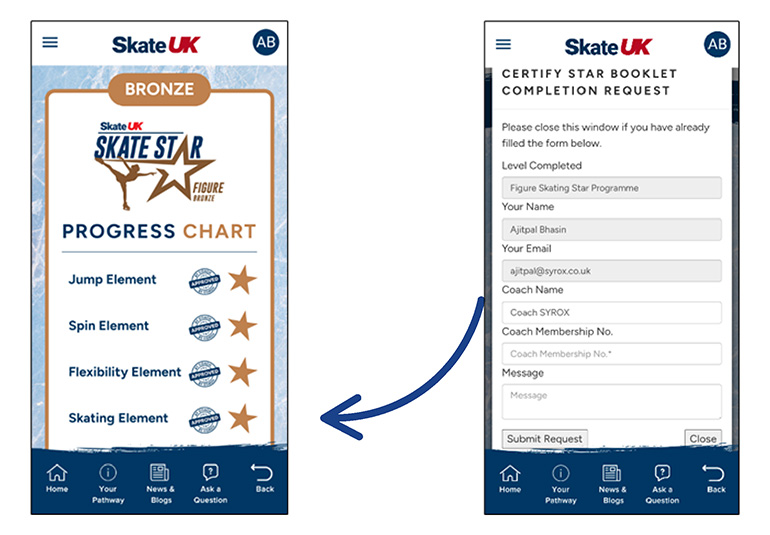
The App’s progress tracker enables the user to self-track their own
progression, for educational & engagement purposes ONLY and does not
enable the user to sign themselves off the programme and move up levels in
their selected rink. Assessment and certification can only be facilitated by
a British Ice Skating licensed coach.
WE MAY END YOUR RIGHTS TO USE THE APP AND THE SERVICES IF YOU BREAK THESE
TERMS
We may end your rights to use the App and Services at any time by contacting
you if you have broken these terms in a serious way. If what you have done
can be put right we will give you a reasonable opportunity to do so.
If we end your rights to use the App and Services:
-
You must stop all activities authorised by these terms, including your
use of the App and any Services.
-
You must delete or remove the App from all devices in your possession
and immediately destroy all copies of the App which you have and confirm
to us that you have done this.
-
We may remotely access your devices and remove the App from them and
cease providing you with access to the Services.
WE MAY TRANSFER THIS AGREEMENT TO SOMEONE ELSE
We may transfer our rights and obligations under these terms to another
organisation. We will always tell you in writing if this happens and we will
ensure that the transfer will not affect your rights under the contract.
YOU NEED OUR CONSENT TO TRANSFER YOUR RIGHTS TO SOMEONE ELSE
You may only transfer your rights or your obligations under these terms to
another person if we agree in writing.
NO RIGHTS FOR THIRD PARTIES
This agreement does not give rise to any rights under the Contracts (Rights
of Third Parties) Act 1999 to enforce any term of this agreement.
IF A COURT FINDS PART OF THIS CONTRACT ILLEGAL, THE REST WILL CONTINUE IN
FORCE
Each of the paragraphs of these terms operates separately. If any court or
relevant authority decides that any of them are unlawful, the remaining
paragraphs will remain in full force and effect.
EVEN IF WE DELAY IN ENFORCING THIS CONTRACT, WE CAN STILL ENFORCE IT LATER
Even if we delay in enforcing this contract, we can still enforce it later.
If we do not insist immediately that you do anything you are required to do
under these terms, or if we delay in taking steps against you in respect of
your breaking this contract, that will not mean that you do not have to do
those things and it will not prevent us taking steps against you at a later
date.
WHICH LAWS APPLY TO THIS CONTRACT AND WHERE YOU MAY BRING LEGAL PROCEEDINGS
These terms are governed by English law and you can bring legal proceedings
in respect of the products in the English courts. If you live in Scotland
you can bring legal proceedings in respect of the products in either the
Scottish or the English courts. If you live in Northern Ireland you can
bring legal proceedings in respect of the products in either the Northern
Irish or the English courts.
ALTERNATIVE DISPUTE RESOLUTION
Alternative dispute resolution is a process where an independent body
considers the facts of a dispute and seeks to resolve it, without you having
to go to court. If you are not happy with how we have handled any complaint,
you may want to contact an alternative dispute resolution provider.